On this page10 sections
- The thesis came first, not the design
- The original brief
- V1: The template trap
- The five anti-template constraints
- Constraint 1: No sans-serif fonts. Serif typography only.
- Constraint 2: No blue-purple palette. Copper and warm amber only.
- Constraint 3: Grain texture over everything.
- Constraint 4: Asymmetric layout. Break the centered grid.
- Constraint 5: Warm black, not pure black.
- Building V2 with constraints applied
- Side by side: what the constraints actually changed
- The OpenClaw workflow behind both versions
- Five hook variants, one winner
- The full tool stack (steal this)
- What this actually demonstrates
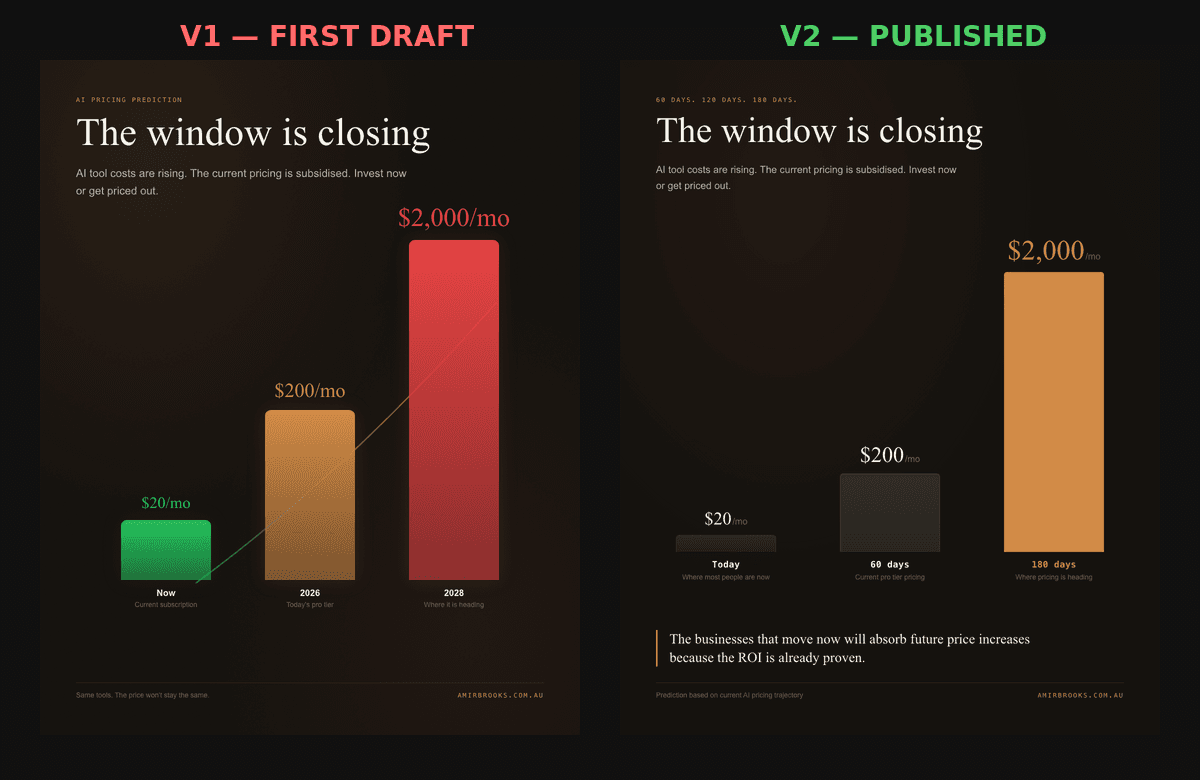
I published a LinkedIn post yesterday. The thesis was contrarian: AI tool costs are going up, not down. The $20/month subscription window is temporary. Businesses that wait to adopt will get priced out.
That post had a custom visual attached to it. Not a Canva template. Not a stock photo. A purpose-built graphic rendered from code, with a specific editorial aesthetic, deliberate typography choices, and a data visualization designed to reinforce the argument visually.
The whole thing took about 47 minutes from "I want a visual for this" to the final exported render.
This article is the full process. Every decision, every wrong turn, every iteration. Because the interesting part is never the finished asset. It is the mess that happened before it existed.
The thesis came first, not the design
Before anything visual was touched, the post itself had to be airtight.
The argument I wanted to make:
- Claude and ChatGPT are $20 per month right now. The pro tiers sit at $200.
- These tools are being deliberately subsidised to capture market share.
- When the subsidy phase ends, pricing moves to $500, $1,000, $2,000 per month.
- Businesses that have already built workflows around AI will absorb the increase because their ROI is proven.
- Businesses that waited will look at the new number and decide they cannot justify it.
This is not a prediction pulled from thin air. It follows the adoption curve of every major technology platform in recent memory.
AWS launched with aggressive pricing, captured developer mindshare, then gradually raised rates once switching costs were high enough that nobody left. Salesforce did the same. Adobe did it with Creative Cloud. The subscription starts cheap to build dependency. The price rises once the dependency is locked in.
AI subscriptions are on that same trajectory. The models keep getting more capable. The compute required to run them scales faster than the efficiency gains that offset it. The companies building these tools are burning cash to grow. That burn rate gets passed to customers eventually.
Once the thesis felt solid, the question became: what kind of visual actually makes this argument hit harder when someone is scrolling through their LinkedIn feed at 8am?
The answer was not "a nice graphic." It was "a specific graphic that communicates urgency through its design language, not just its data."
The original brief
The visual needed to do three things:
-
Stop the scroll. LinkedIn feeds are cluttered with blue-and-white infographics, stock photos with text overlays, and AI-generated imagery that all blurs together. Whatever this was, it needed to not look like those.
-
Reinforce the argument. The post is about escalating costs. The visual needed to make you feel that escalation viscerally, not just show you a chart.
-
Signal credibility. The visual needed to look like something a real designer made with intention, not something someone typed into an image generator and accepted the first output.
With those constraints in mind, I turned to the workflow.
V1: The template trap
The first version was built as a Remotion composition. Remotion is a React-based framework that lets you create videos and stills from code. I have a library of templates running on a VPS, so spinning up a new composition is a matter of writing a React component and triggering a render.
The first render came back quickly. Three bars on a dark background. Green for $20, amber for $200, red for $2,000. "The window is closing" as the headline. Clean layout. Technically correct data visualization.
And it looked exactly like something you would get if you asked any AI image tool to "create a LinkedIn infographic about rising costs."
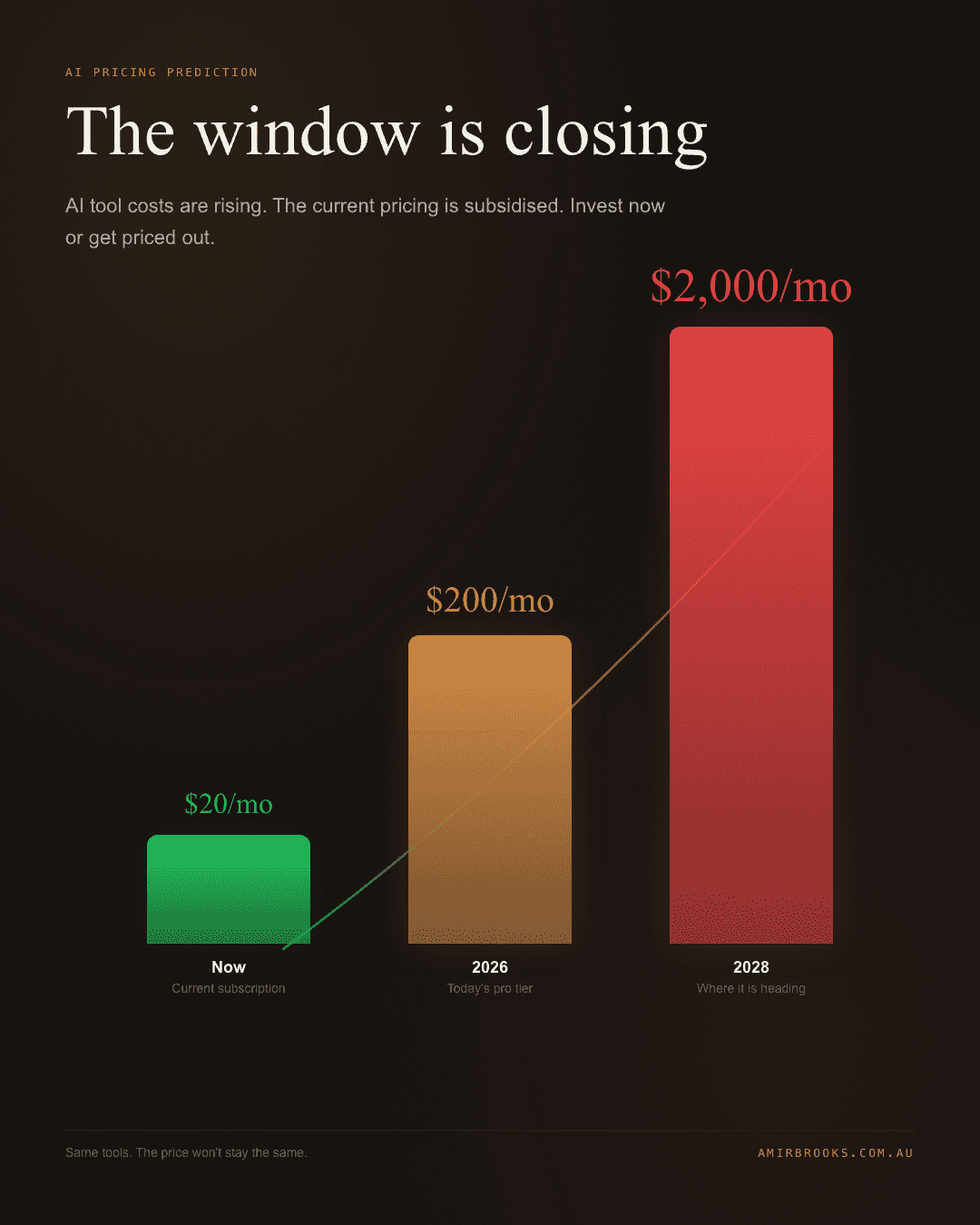
Here is what was wrong with it, and why it matters:
The colour palette was too saturated. Bright green, amber, and red against a dark background is the default palette of every "professional" infographic template. It reads as generic immediately. Your brain has seen this colour combination on thousands of data graphics and has learned to skip past it.
The layout was perfectly symmetrical. Everything centered. Everything balanced. Safe composition. And that is exactly the problem. Safe compositions do not stop scrolling. They are designed to be inoffensive, which means they are designed to be invisible.
The typography was clean but interchangeable. Sans-serif fonts, evenly weighted, properly kerned. Nothing wrong with any of it technically. But also nothing that signals "a human made deliberate choices here." It could have been any company's quarterly report graphic.
The background glow was AI-default dark mode. That radial glow emanating from behind the chart is what happens when you tell a design tool "dark background." It is the equivalent of lens flare in photography. A crutch that signals "I did not know what else to do with this empty space."
The overall impression: competent but forgettable. The kind of visual that makes you nod slightly and keep scrolling. It communicates the data. It does not stop you.
This is what I call the template trap. The output is polished enough that you think it is done. Every element is well-executed in isolation. But the sum total looks like every other AI-assisted graphic in the feed, which means it carries zero signal about who made it or why you should care.
Most people publishing AI-generated visuals stop here. The output looks professional. It took five minutes. Why would you iterate?
Because professional and distinctive are completely different things. Professional means "nothing is wrong." Distinctive means "you remember this."
The five anti-template constraints
Instead of saying "make it better" (which is the vaguest possible instruction and reliably produces marginal improvements), I identified the specific conventions that made V1 look generic and created rules to violate each one.
Constraint 1: No sans-serif fonts. Serif typography only.
Sans-serif is the default of modern web design, SaaS marketing, and AI-generated content. It is clean, readable, and completely expected. Every LinkedIn carousel, every product launch graphic, every "5 tips for founders" post uses some variation of Inter, Roboto, or DM Sans.
Switching to serif typography immediately signals editorial intent. It says "publication" rather than "product page." It says "someone chose this font for a reason" rather than "the tool picked the default."
The difference is subtle on a conscious level but significant on a pattern-matching level. Your brain processes typeface choices before you read the actual words. A serif headline on a dark background triggers associations with premium publications, financial reporting, and considered journalism, not SaaS marketing.
Constraint 2: No blue-purple palette. Copper and warm amber only.
The blue-to-purple gradient is the official colour of AI. Look at any AI company landing page, any "future of work" LinkedIn post, any generative AI tool's marketing. Blue and purple everywhere.
Which means blue and purple are now noise. They are the visual equivalent of saying "leveraging AI" in your copy. Technically relevant. Completely devoid of signal.
Copper and warm amber accomplish two things. First, they are unusual enough in the LinkedIn feed to register as different. Second, they connect to the personal brand (amirbrooks.com.au uses warm tones), which creates visual consistency across touchpoints.
The colour choice was not about aesthetics in isolation. It was about what the colour signals in the context of hundreds of other posts competing for the same attention.
Constraint 3: Grain texture over everything.
AI-generated visuals are clean. Perfectly smooth gradients. Zero noise. Every pixel precisely placed. This is actually a dead giveaway now. Real editorial design has texture. Print has grain. Photography has noise. Film has artifacts.
Adding a subtle grain layer over the entire composition does something counterintuitive: it makes the digital output feel more human. It introduces the kind of imperfection that expensive design studios add deliberately because they know perfectly clean output reads as synthetic.
This is a small detail. Most viewers will not consciously notice the grain. But they will unconsciously register the difference between this visual and the perfectly clean AI graphics surrounding it in the feed.
Constraint 4: Asymmetric layout. Break the centered grid.
Centered, balanced layouts are the safest possible composition choice. They are also the most common, which makes them the least effective at capturing attention.
Left-aligning the headline, creating uneven spacing, and allowing the chart to occupy an asymmetric portion of the frame introduces visual tension. Your eye has to work slightly harder to navigate the composition, which means you spend more time looking at it.
This is a basic principle from print editorial design that most digital content ignores. Magazines figured out decades ago that asymmetry creates engagement. The web defaulted to centered layouts because CSS made them easy, not because they were effective.
Constraint 5: Warm black, not pure black.
This is the nerdiest constraint and possibly the most impactful. Pure black (#000000) is a screen colour. It exists in digital contexts: OLED screens, code editors, terminal windows. Warm black (something like #1a1612) is a print colour. It exists in physical contexts: magazine pages, gallery walls, premium packaging.
The difference is imperceptible when described. When seen, it changes the entire feeling of the composition. Pure black feels technical. Warm black feels considered. Pure black says "dark mode." Warm black says "someone chose this specific shade."
Every premium brand in print uses warm blacks. Fashion editorials. Architecture magazines. Luxury brand campaigns. The reason is that pure black creates a dead space that the eye slides off. Warm black creates depth that the eye settles into.
Building V2 with constraints applied
With these five constraints defined, the Remotion composition was rebuilt. Same data. Same three bars. Same headline. But every surface-level design decision was different.
The bars shifted from bright saturated colours to a dark charcoal-to-copper gradient progression. The headline moved from center to left alignment. The typography switched from sans-serif to a serif stack. A grain texture was layered over the entire composition. The background went from pure black with a digital glow to warm black with subtle depth.
A pull-quote block was added at the bottom with a copper accent bar, pulling a key line from the post text. This created an additional visual anchor and gave the composition a more editorial structure, like a page from a magazine rather than a chart on a slide.
The footer was reworked with the personal brand URL in letterspaced copper, grounding the piece in attribution without looking like a watermark.
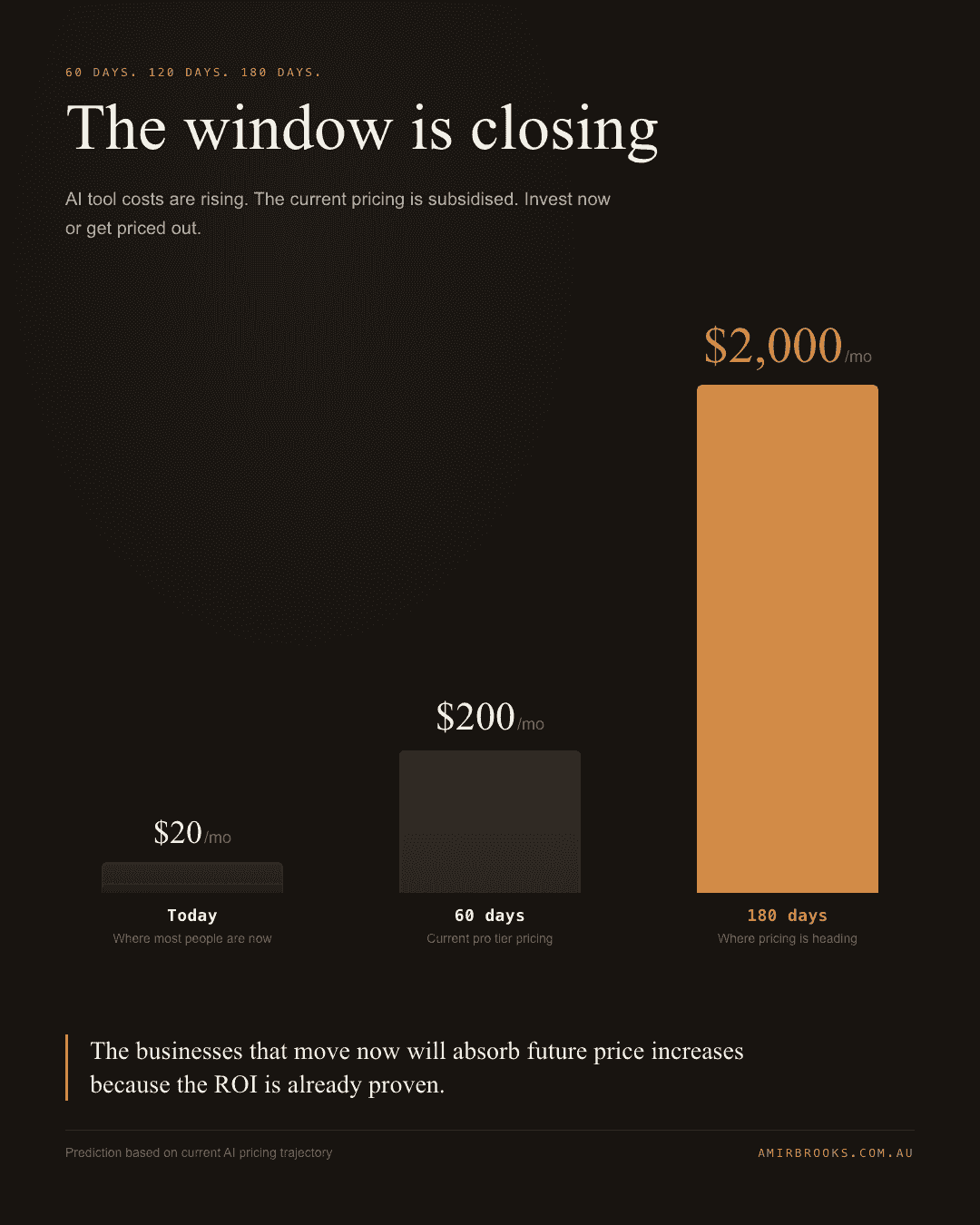
Same information. Completely different signal.
Side by side: what the constraints actually changed
When you put V1 and V2 next to each other, the difference is immediately obvious even if you cannot articulate why.
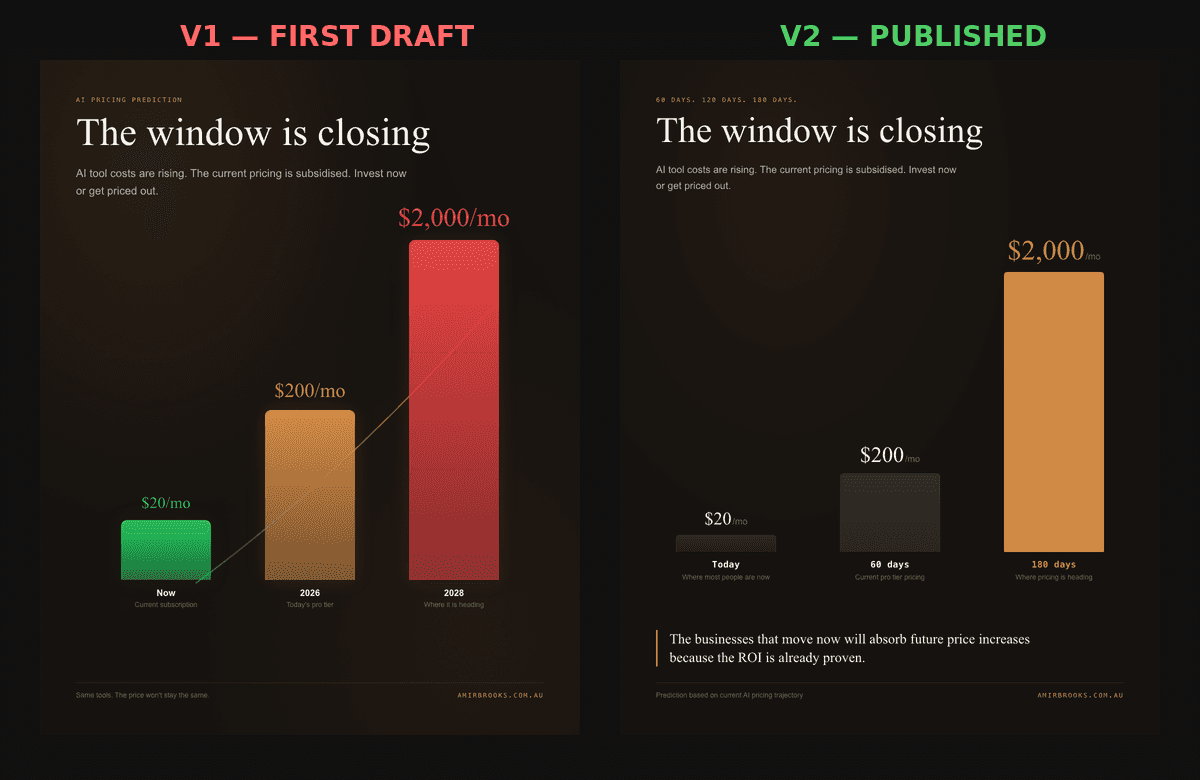
V1 reads as "generated." The colours are too bright. The layout is too balanced. The typography is too safe. Every element is individually fine, but the combination signals "an AI tool made this with default settings."
V2 reads as "designed." The palette is restrained and intentional. The layout has tension. The typography carries editorial weight. The grain adds texture. The warm black adds depth. The combination signals "someone with opinions made this."
That signal is the entire game on LinkedIn. The feed is infinite. Attention is scarce. The content that earns attention is not the content with the best data. It is the content that communicates "this was made with care" in the 0.3 seconds before someone scrolls past.
V1 is accurate. V2 is distinctive. Distinctive wins.
The OpenClaw workflow behind both versions
Neither version was designed in Figma. Neither was made in Canva. Neither came from an image generator.
Both were built as Remotion compositions, meaning they were literally React components that render to video frames and static images. The composition lives in a template library on a VPS, and the render pipeline is triggered through conversation with an AI agent running OpenClaw.
OpenClaw is the system I use to orchestrate AI agents. In this case, the workflow looked like:
- I described what I wanted the visual to communicate (not what it should look like)
- The agent wrote the Remotion composition as a React component
- The component was deployed to the VPS template library
- The first render was triggered and output was reviewed
- I provided specific constraints (the five rules above)
- The agent rebuilt the composition with those constraints
- The second render was triggered
- Both versions were exported as 1080x1350 stills and 6-second videos
The critical moment in that workflow was step 5. The difference between V1 and V2 was not better prompting or a better model. It was me knowing which specific conventions to violate.
If I had said "make it look more professional," V1 would have gotten slightly cleaner and slightly more forgettable. The output follows the specificity of the direction. Vague direction produces vague improvement. Specific constraints produce distinctive output.
This is the skill that matters in 2026 and beyond. Not "how to use AI." Everyone uses AI. The differentiator is knowing what to ask for, which means knowing what is wrong with the defaults and having specific opinions about how to fix them.
That knowledge comes from studying design, understanding visual conventions, and paying attention to what makes some content stop your scroll while most content does not. The AI is the execution layer. The taste is yours.
Five hook variants, one winner
The visual was only half the equation. The post text went through five different opening hooks before one was chosen.
Hook 1: The timeline approach "60 days. 120 days. 180 days. That's how long you have before AI tools get expensive."
Problem: Opens on abstract numbers before the reader knows why they should care about those numbers.
Hook 2: The pricing data lead "Claude is $20/month right now. It will not stay there."
Problem: Factual but flat. No emotional weight. Reads like a product update, not a warning.
Hook 3: The unpopular opinion format "Unpopular opinion: AI tools are about to get dramatically more expensive, not cheaper."
Problem: "Unpopular opinion" is one of the most overused LinkedIn hook formats. It signals the writer has nothing distinctive to say, so they are borrowing a format that worked for other people.
Hook 4: The subsidy angle "The AI companies subsidising your $20 subscription are losing money on every user. That changes soon."
Problem: Too inside-baseball. Assumes the reader understands and cares about AI company economics before you have established why it matters to them personally.
Hook 5: The one that shipped "The businesses that disappear in the next 6 months won't fail because of bad products. They'll fail because they waited too long to invest in AI while it was still affordable."
Why this worked:
The opening line makes an assumption the reader already holds ("businesses fail because of bad products") and immediately tells them they are wrong. That creates a cognitive gap. The reader needs to keep reading to resolve the dissonance.
"6 months" is specific and uncomfortable. Not "someday." Not "eventually." Six months from now. That is close enough to feel urgent and far enough to feel actionable.
"bad products" is the red herring. The reader expects the threat to be product quality, because that is the standard business narrative. Pivoting to affordability of AI tools reframes the conversation in a way the reader did not anticipate.
The hook operates on loss aversion. People are more motivated to avoid losing something than to gain something equivalent. The post is not saying "invest in AI and you will grow." It is saying "if you do not invest in AI, you will fail." Same information. Completely different emotional response.
Four hooks were technically accurate. One created the right emotional response in the first two seconds. Accuracy is necessary but not sufficient.
The full tool stack (steal this)
Here is everything that went into producing the post and visual:
Concept and writing: Conversation with an AI agent (OpenClaw orchestrating Claude). The thesis was developed through back-and-forth discussion, not a single prompt. The agent challenged assumptions, suggested angles, and stress-tested the argument before any writing started.
Visual design: Remotion (React-based video/image framework). The composition was written as a TypeScript React component. No drag-and-drop tools. No image generators. Code that renders to pixels.
Render pipeline: VPS with Remotion templates pre-installed. New compositions are written, registered, and rendered server-side. Output is both video (6 seconds, 1080x1350 for LinkedIn portrait format) and a poster still frame.
Design direction: Five specific anti-template constraints applied manually after reviewing V1 output. This is the part that AI cannot do for itself yet, knowing which conventions to break requires understanding why those conventions exist and when they stopped being effective.
Hook testing: Five variants written, compared against engagement principles (loss aversion, cognitive gaps, specificity). No A/B testing tool involved. Just understanding what makes people stop scrolling and choosing the variant that executes best against those principles.
Total time: About 47 minutes from deciding to create a visual to having the final exported still.
Total cost: The AI subscription I already pay for, plus VPS hosting I already run. Marginal cost of this specific visual: approximately zero.
Tools not used: Canva. Figma. DALL-E / Midjourney / any image generator. Stock photography. Design templates. Freelance designers.
What this actually demonstrates
This is not a post about making pretty LinkedIn graphics. If you want pretty graphics, Canva is faster and easier.
This is about what happens when you treat AI agents as production partners rather than content vending machines.
The dominant AI content workflow in 2026 looks like this: type a prompt, accept the first output, publish. The result is competent, generic, and invisible. It blends into the ocean of other AI-generated content because it was made with the same tools, the same defaults, and the same level of creative direction (none).
The workflow I am describing is different. The AI handles execution. The human provides taste, constraints, and creative direction. The output is distinctive because the direction was specific.
That distinction, between letting AI generate and directing AI to create, is the gap that separates content that performs from content that fills a publishing schedule.
Every creative constraint I applied made the output more distinctive. Removing options (no sans-serif, no blue, no symmetry, no pure black, no clean gradients) forced the output into territory that default AI settings cannot reach.
Constraints are not limitations. They are the mechanism that produces quality.
The businesses and creators who understand this will build visual identities that feel human and intentional, even when AI does most of the actual rendering. The ones who do not will publish technically competent content that no one remembers seeing.
The tools are the same. The direction is what makes the difference.
What is your process for creating visual content? Are you accepting defaults or defining constraints?
#AI #ContentCreation #LinkedInStrategy #BuildInPublic
- Date
- March 29, 2026
- Read
- 16 min read
- Words
- 3,156
- Topic
- AI Agents
- Author
- Amir Brooks